Monday, 20 February 2012

[~>VU-P!nD!<~] Nayab Dua 4 ALL muslim


--

Nayab Dua


ALLAH PAK


App ko Bakhsh De


Aesi Mafi Jis Ka Baad Gunnah Na Ho

Aesi Hidayat Jis Ka Baad GumRahi na Ho

Aesi Raza jis Ka baad Narazgi Na Ho

Aesi Remat jise Ka Baad Azab na ho

Aesi kamyabi Jis Ka baad Nakami Na Ho

Aesi Dua Jis k baad Rud  Na Ho


***AMMEN***


کیا ہوا جو تیرے ماتھے پہ ہیں سجدوں کے نشان

کوئی ایسا سجدہ بھی کر جو زمین پر نشان چھوڑ جائے


    VU Club


--
You received this message because you are subscribed to the Google
Groups "vupindi" group.
To post to this group, send email to vupindi@googlegroups.com
To unsubscribe from this group, send email to
vupindi+unsubscribe@googlegroups.com
For more options, visit this group at
http://groups.google.com/group/vupindi?hl=en

[discussion_vu] [Tips for Computer] Increase the Number of Search Results Shown on First Page of Google

Google Search is great way to find anything anywhere on Internet, all of us has been so addicted to use Google for searching as it provides nice and useful search results. When you search on Google the default number of search results you see is 10 and then in order to see the next 10 search results you will need to scroll down and then click the number 2 or next in Google logo in yellow color to see the next 10 search results.


You can also increase the number of search results being shown on the first page, follow the procedure given below to do it.
1. Open Google.com
2. Click the Search Settings on the extreme right top of the Google page
It will look like as shown below when you are not logged in with your Google account.

It will look like as shown below when you are logged in with your Google account.


Scroll down to locate the section which tells number of search results, change number of search results shown on the first page by selecting a fixed number in the drop down here.

Now click the button Save Preferences button on the extreme right bottom of this page, it will prompt with a confirmation that your new preferences has been saved, now click OK button on the prompt message.
Once you click ok, it will take you to Google search home page automatically.
Increase the Number of Search Results Shown on First Page of Google.


Top 10 Searches


--
Posted By Blogger to Tips for Computer at 3/15/2010 05:50:00 AM

--
You received this message because you are subscribed to the Google Groups "Virtual University of Pakistan" group.
To post to this group, send email to discussion_vu@googlegroups.com.
To unsubscribe from this group, send email to discussion_vu+unsubscribe@googlegroups.com.
For more options, visit this group at http://groups.google.com/group/discussion_vu?hl=en.

[discussion_vu] [Tips for Computer] How to hide your important data from other users?


Normally when we need to secure your important data from other users, then our first choice is to burn it on CD or put it to removable drive instead of hard drive. But imagine if our data size is more than 100 GB then we can not burn it on CD. In such situation we can save full drive from other users access using this trick.
Perform the given steps to hide your system data partition:

Follow the below steps to hide your important data?
1. First of all login to computer with administrative rights.
2. First click on Start button to open "Run" and type "CMD" (without the quotes) then press Ok button to open Command Prompt.

3. Now type diskpart on the blinking cursor and wait for 5 seconds to appear diskpart> utility.


4. To show the list of volume, type list volume command after the diskpart> prompt, this command will show you all system drives detail.


5. Now first select the volume that you want to hide, for example,
6. If you need to hide F drive then first type select volume 2 (in this case) and press enter button.


7. After loading volume, type remove letter F (in this case) to hide F drive.


8. Now exit from command prompt and open My Computer to verify drives.

9. But next time, when you want to unhide the D drive, just run assign drive F command

after loading volume 2.


    --
    Posted By Blogger to Tips for Computer at 10/16/2010 12:26:00 AM

    --
    You received this message because you are subscribed to the Google Groups "Virtual University of Pakistan" group.
    To post to this group, send email to discussion_vu@googlegroups.com.
    To unsubscribe from this group, send email to discussion_vu+unsubscribe@googlegroups.com.
    For more options, visit this group at http://groups.google.com/group/discussion_vu?hl=en.

    [discussion_vu] Top news today: The World's 50 Most Innovative Companies


    LinkedIn Today LinkedIn TODAY The week's top news, tailored for you


    Hi Muhammad, check out the top 5 news articles for you this week
     
     
    Twitter Want the latest news? Follow us @LinkedinToday


    The World's 50 Most Innovative Companies
     
     
    fastcompany.com - Welcome to our annual guide to the businesses that matter most, the ones whose innovations are having an impact across their industries and our culture. Click a company name to view the entry, or determine your own ranking of...


    Trending within the following companies


    LinkedIn
     
    LinkedIn
     
     
    IBM
     
    IBM
     
     
    Southern New Hampshire University
     
    Southern New Hampshire University


    How Target Figured Out A Teen Girl Was Pregnant Before Her Father Did
     
     
    forbes.com - Target has perfecting the technique of analyzing consumers' shopping habits to figure out who's pregnant. How can they send customers congratulatory coupons without freaking them out?


    Trending within the following companies


    IBM
     
    IBM
     
     
    Microsoft
     
    Microsoft
     
     
    Oracle
     
    Oracle


    Big Data Is Big Market & Big Business - $50 Billion Market by 2017
     
     
    forbes.com - We all know that Big Data is the hottest sector in IT at the moment. I've been covering this market since it started so I'm so excited by the recent new market size numbers. But the question on everyone's mind is just how big...


    Trending within the following companies


    IBM
     
    IBM
     
     
    IIR
     
    IIR
     
     
    Oracle
     
    Oracle


    How to cut 70 percent of your IT budget in one year
     
     
    gigaom.com - Precise's Zohar Gilad explains how his company shaved more than $2 million from its annual IT budget by migrating its IT infrastructure and applications to the cloud.


    Trending within the following companies


    IBM
     
    IBM
     
     
    Salesforce.com
     
    Salesforce.com
     
     
    Oracle
     
    Oracle


    Why Oracle May Really Be Doomed This Time
     
     
    pandodaily.com - I was laying awake early this morning thinking about Oracle. Back when it was starting its $20 billion buying spree of companies in 2006, analysts all said the strategy would fail. There were a ...


    Trending within the following companies


    Salesforce.com
     
    Salesforce.com
     
     
    Oracle
     
    Oracle
     
     
    IBM
     
    IBM


    SEE MORE ON LINKEDIN TODAY


    Better. Faster. The New LinkedIn Mobile App for iPhone and Android.


    You are receiving Today emails weekly. Change to daily or unsubscribe
     
    This email was intended for Muhammad Tausif. Learn how this information helps us protect your security. © 2012, LinkedIn Corporation. 2029 Stierlin Ct., Mountain View, CA 94043, USA


    [discussion_vu] [Tips for Computer] How to sum cells in Excel Sheet using Wildcards?

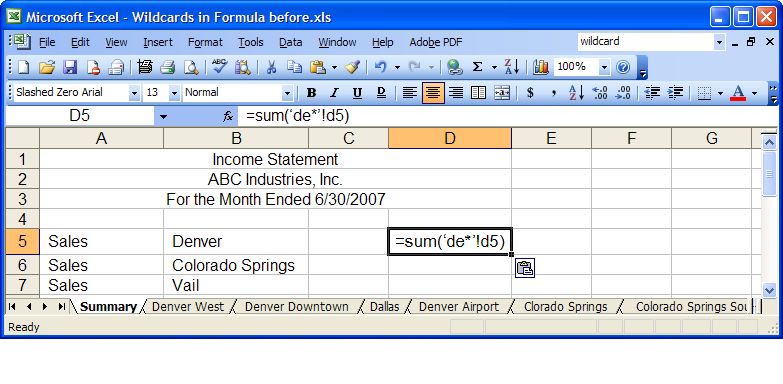
    In the workbook below we have multiple sheets, each of which contains the sales and
    expense data of our different store locations. The challenge is to sum up all the Denver
    stores and all the Colorado Springs stores. The key to success in making the this
    procedure work is the way the tabs are named for the stores. Because all the Denver store
    sheets are named something that starts with "De" and none of the other sheets have
    names that start with "De" we can easily and quickly build a formula that sums up only
    the Denver Stores. Here is how it works:

    1. Enter the following formula in cell D5 of the summary sheet:
    =sum('de*'!d5)


    Notice that the de* is surrounded by single quotation marks and that the d does not have
    to be capitalized.
    2. Press enter and Excel turns the formula you typed into the following formula:
    =SUM('Denver West:Denver Downtown'!D5,'Denver Airport'!D5)

    --
    Posted By Blogger to Tips for Computer at 2/20/2012 03:53:00 AM

    --
    You received this message because you are subscribed to the Google Groups "Virtual University of Pakistan" group.
    To post to this group, send email to discussion_vu@googlegroups.com.
    To unsubscribe from this group, send email to discussion_vu+unsubscribe@googlegroups.com.
    For more options, visit this group at http://groups.google.com/group/discussion_vu?hl=en.

    [discussion_vu] Workshop on ECG Interpretation

    [VUSR] 64991 Certified Information System Security Professional (CISSP) Training Program


    --
    Abdullah Baig
    Asst Training Coordinator
    3D EDUCATORS
    9221-34141329, 9221-34857148
    Suite # 7, Noble Heights, Opp Sales Tax House/Askari
    Main University Road Karachi 

    --
    Please visit http://vusr.net for Old and Latest Papers, Assignments, Quiz and GDBs.
     
    http://VUSR.net The ultimate VU Study Resource
     
    You received this message because you are subscribed to the Google
    Groups "VUSR" group.
     
     
    To unsubscribe
    vusr+unsubscribe@googlegroups.com
    To Visit Group Home Page
    http://groups.google.com/group/vusr?hl=en?hl=en